Overview
This application can make use of Amazon Polly and Azure Speech for the actual audio generation, but also can take studio audio files and use it for natural voice. And it makes use of “character styles” to indicate if a character is speaking or use the “narrator.” You can also use paragraph styles for special occasion, like, for example, adding pauses before and after the text of a “Chapter,” Nuances such as raising a voice, speaking faster or emphasis is achieved through non-style application of modifiers such as bold, italic.
Special effects can be added using Sox syntax through highlighting. For example, yellow highlight is set to add an echo effect the current speakers voice.
Polly/Azure use standard xml markers that needs to be embedded inside a <speak>WHAT?</speak> document. Each call can only be using one “voice” so most of the complexity of the work is to build a series of statements that be read by ONE voice. Typically, character switches are the more likely to cause voice change, while character modifiers can be added and embedded.
Speech Generation
Voice tags can be from simple to complex, perform one task or many, use two different types of value. Example, volume can be set as an enumeration (loud, moderate…) or by decibel (+6dB). Here is an example from my logs (format: ‘(‘ <test to send>, <voice to use> ‘)’. Although Polly and Azure are using SSML to create the audio resulting from the instructions, A.B. Genesis uses more human and writing terminologies to allow construction of rich audio.
(<prosody pitch="-20%"><prosody rate="100%"><amazon:effect vocal-tract-length="+10%">I know… But, just for the principle… </amazon:effect></prosody></prosody>, Matthew)This makes it harder to use directly. Therefore, in order to ease the projection of human notions unto Amazon Polly language is required.
[ssml]
emphasis=emphasis,level,strong,false
break=break,strength,medium,true
delay=break,time,1s,true
lang=lang,xml:lang,fr-FR,false
pitch=prosody,pitch,+20%,false
rate=prosody,rate,-10%,false
volume=prosody,volume,50dB,false
loudness=prosody,volume,loud,false
size=amazon:effect,vocal-tract-length,101%,false
phonation=amazon:effect,phonation,soft,false
The format is AB Genesis verb = Polly tag, attribute name, default value (to create test statements) and whether or not the element is before or after as opposed to enclosing.
Polly also allows to retrieve the available voices for various languages and locals. Currently us-EN is used by default.
What is a Neural Voice?
For all intent and purposes, a voice is an atomic element that can achieve also some modulation. Here are the main ones:
| Azure | Polly | |
| Rate | Yes | Yes |
| Pitch | Yes | Yes |
| Volume | Yes (in ratio) | Yes (in dB) |
| Styles | Yes (a few voices) | No |
| WPM | Yes (many voices) | No |
| Pauses and breaks | Yes | Yes |
| Locale | Yes | Yes |
| Gender | Yes | Yes |
Styles
Styles are fairly new and allow to select a variant on a voice (sad, cheerful, newscasters…). It is available only on a few voices. To compensable, A.B. Genesis implements some alternatives as style for when something is not supported.
Example: The Style “whispering” can be somewhat mimicked by lowering the volume by 20% and slightly accelerating the pace. It’s not perfect, but it does the job. This puts some emphasis that voices with styles should be used for main characters or colorful ones.
Managing Voices
Voices are management through the “Voices” tab.
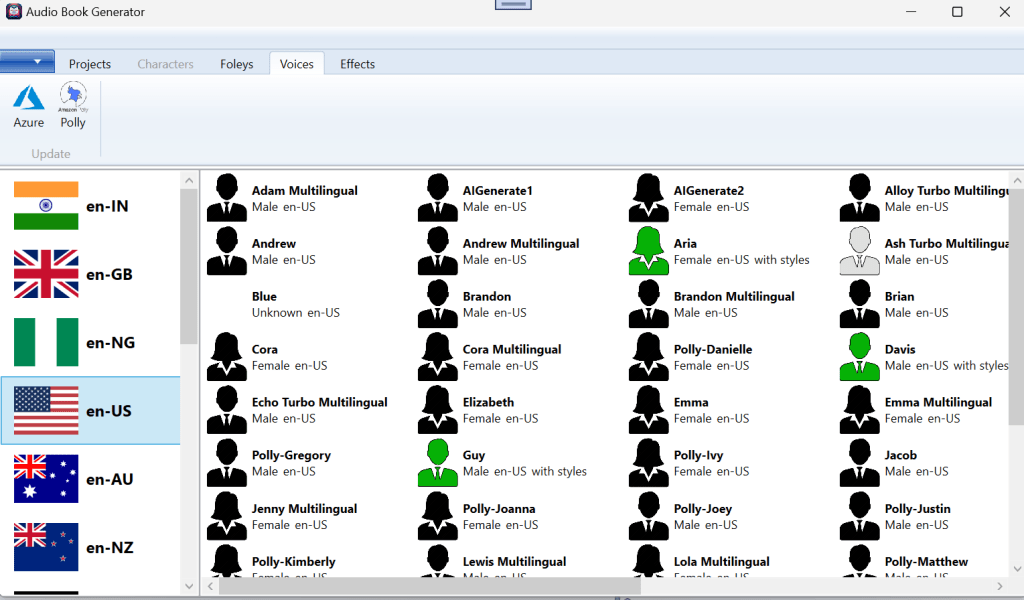
Voices in gray are new voices without a local sample file to speed up finding out the “right voice” for the character. The voices in green support styles. Hovering the mouse over will show the list of all the styles supported by the voice. Right-clicking on a voice will offer to create a sample or to create a character out of that voice.
 Christian-Eric Falardeau