Overview
A part of the application deals with the addition of sound effects and ambient noises to add to the realism of the audio book. In honor of the movie industry, this section is called Foley. AB Genesis supports, for now, three layers of audio.
The Basics
Generated audio and soundbites
To form the sequence of audio files that will constitute the “foreground.” Example:
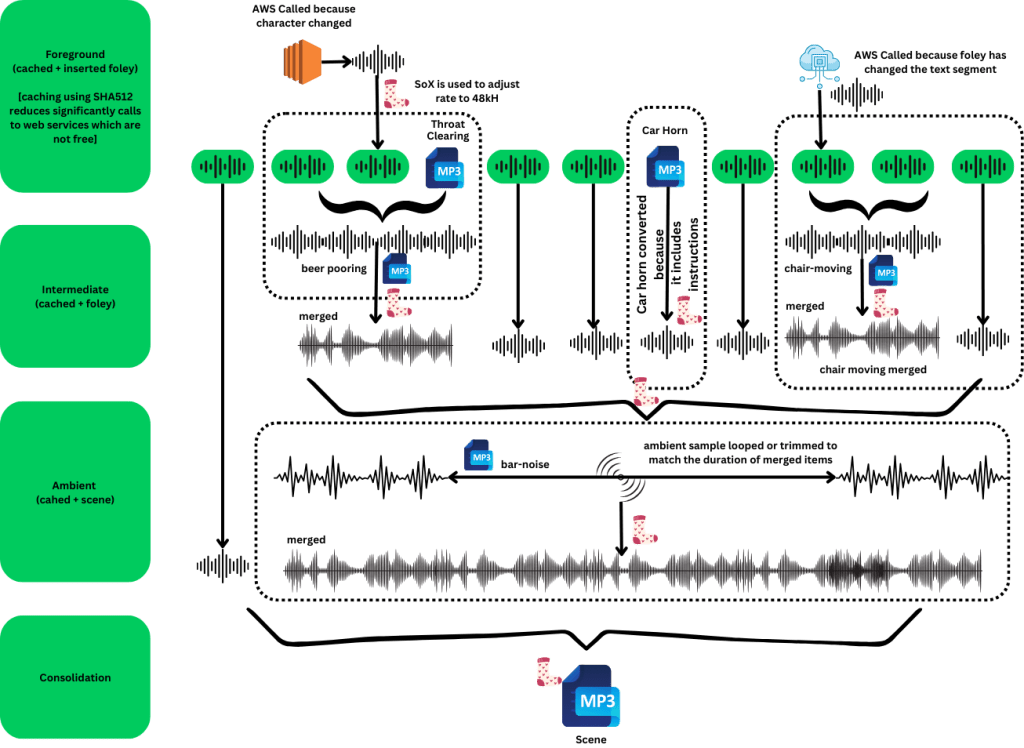
(talk) (talk) (talk) (car horn) (talk) (talk) (talk). The length of the concatenation of all of those audio files (fixed as ‘Foley’ mp3 files). An important detail is that “car horn” will be INSERTED. Thus those soundbites will be in between into elements of generated audio.
That feature is accessed by inserting automobile-horn inside the word file using the “INSERT” character style.
Merged Sounds
Although inserted audio is great for brief sounds (like a gun shot or sarcasm), it can be annoying if you want the talking to be still heard. In this case, you could always just merge the audio. Unfortunately, it is hard to predict the size of the files generated from Polly. In these cases, you can use ‘audio-merge’ to specify a file to be played in the background (defaulting at -3dB). Once enough Polly or Inserted files to be just a little longer than the audio file to merge, all the files are concatenated and merged into a temporary file and that new file will replace the merged ones in the final product.
That feature is accessed by inserting [[foley:pouring-water]] inside the word file. Ony ONE concurrent merge is possible at this time. However, it is allowed to specify more than one file and a newly merged copy will be used as the one file.
Ambient Noises
Besides having action-related sounds, it can also ne nice to have environmental noises. Cars in the background, inside a bar, near a meadow, or even combination of all of those are considered ambient noises. The idea here is to specify ambient sounds either once or through various marks. Same as for merged sounds, files can be combined to same one temporary sound. Ambiant noises are usually refered to as “scenes”.
Example, a scene starting and finishing in a bar, with a sequence of passing bar could be expressed as:
[[scene:bar-noise]]
Lots of story and talks
[[scene:bar-noise+car-parade]]
More story, less loud.
[[scene:bar-noise(v=0.2)]]
Lots of story and talks
[[end-scene]] This can be omitted if you want to ambient noises to continue until the end.
AB Genesis will create a looped version of the ambient noises to march exactly the part of the foreground it covers.
The structure of a high-level foley.
Although basic foleys are made defined from audio files (48Khz, mono MP3 files), the real useful portions are how they are used and combined. One or many foley files can be assembled to create a “single foley.” This foley is equipped with the following instructions:
How to combine the files
- Concatenate (default)
- Concurrent
- Random
When “Concurrent” is used, an additional parameter is used to determine how to apply the “merge”: Justify. It applies exactly like it would for text. Left/Right/Center aligned and all audio files extended to fit the longest in “Justify.”
In addition to that, the user can control the repetition (if any) of a smaller foley intro a larger one (like footsteps in a short walk). Repetition is specified in number of repetitions (like 3 times) or in seconds (ex: 17 seconds).
The result can then have an default or project effect applied to it.
Random and real-life example
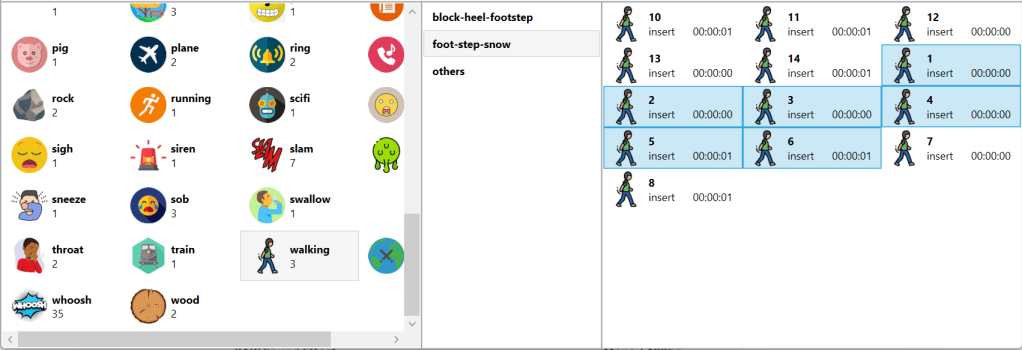
The Random combiner is very useful when the same foley is required on a frequent matter, but it would be more pleasant if there was some variations. In this example, individual foot steps in the snow were recorded by a foley engineers. We now want to use these to simulate a more realistic walk in the snow at the foot of montains.

Project Foleys
Single-foleys need to be attached to a Project Foley. A project foley has some of the same feature as a Single Foley (combination mode) and a name.
In general, a Project Foley will contain a single Single Foley which will only have one foley file.

Foley Organization
AB Genesis currently has over 5000 foley effects in stock (ALL royalties free and legally usable in an audiobook). This requires some level of organizations. The first level is the category (ex: cars, expressions, ringtone…). The second is to be used when the foleys are part of a tightly coupled group like the “foot-step-snow” collection from above.
Importing foleys
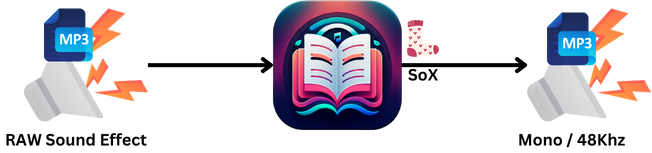
Any audio file can ultimately be imported into AB Genesis as a foley file. They will undergo a transformation so that they can be merged with the other audio files. The end format is .MP3, mono at 48Khz and be imported and renamed to match the structure of the foleys. Note: imported foley files are integrated in the global foley files, but under the “user” group.
To import MP3 files, drag & drop the files into the right-most pane. The following dialog will appear for each one.
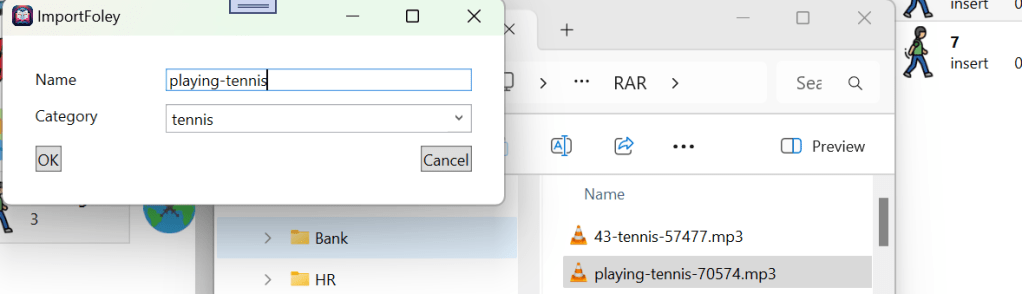
If the category does not exist, a new one will be created and the user will be able to upload an icon to better visualise the group./
An image and an example
 Christian-Eric Falardeau