Overview
Foleys are real-life sounds and effects to make audio more relatable and contextual. The term comes from the movie industry. There are 3 types of foleys that can be used:
- Inserts (short and inserted between dialogs or narration)
- Foleys (short or long and played along dialogs or narration until the foley ends)
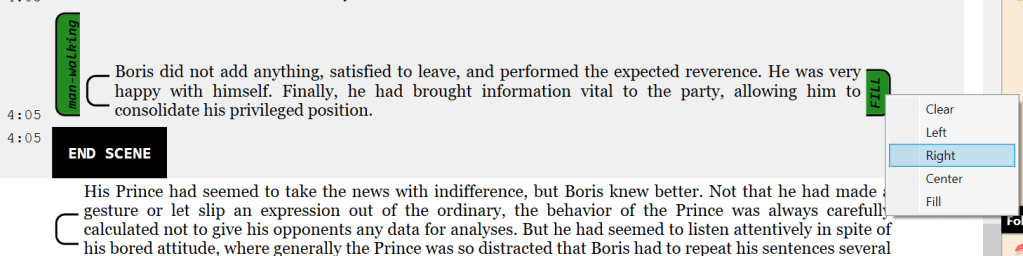
- Justified Foleys (short or long and played along dialogs or narration until the text ends). Justified foleys also contains a placement option
- Left (starts with the text, but will be trimmed at the end of the text)
- Center (the foley will be aligned so that their centers matched, but will never be longer than the text)
- Right (starts to that both the foley and the text ends at the same time, but will never be longer than the text)
- Fill (starts and ends with the text; the foley is trimmed or looped to match the length of the text)
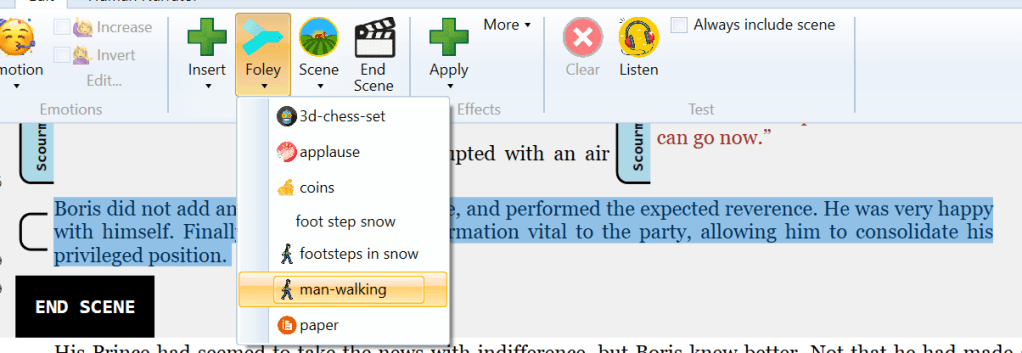
In the example above, we want to have the “man-walking” defined previously played the whole time while the narrator describes Boris’ exit. As you can see, right clicking on the end of the justified foley allows to specify how to “justify” the foley.
Inserts & Regular foleys
Inserting a foley will stop the human or generated voices, inject the foley sound and resume normal processing. It appears as a full rounded block with a light green background. Below is a good example of mixing inserts and foleys. The first foley is an insertion of a tennis ball being served. The second one is of a ball hitting the ground and being returned that will be played at the same time as “was returned with as force, and score.”

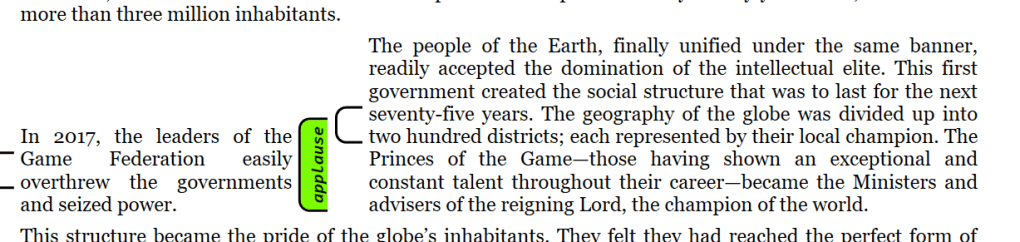
Here is another example where a crowd applause is added to evoke the people of the Earth uniting.
More options are discussed in the section to “Selecting Blocks.”. In all those cases, right-clicking on a foley and selecting Clear to remove the foley.
 Christian-Eric Falardeau