Devices are physical or logical constructs in this system that are addressable and provides certain services. To make each sub-system as independents as possible, and to foster reuse of sharable components, devices are implement as composite objects. Each device has the mandate to return an object implementing the target function (or null if it does not support it).
By default, the base Device class tries to see if the descendant class implements directly the interface (most of the time) or if it reuses a base implementation (ex: DLNAMediaStreamer is used by all DLNA devices so it is implemented only once). Also, if the device supports certain normalized commands, an “inferred interface” can be used. Ex: if a device supports “PowerOn”, “PowerOff” or “PowerToggle”, an InferredPowerManagement is created automatically for you (very useful to automatically integrates IR controlled devices).
Here is a list of the most common interfaces:
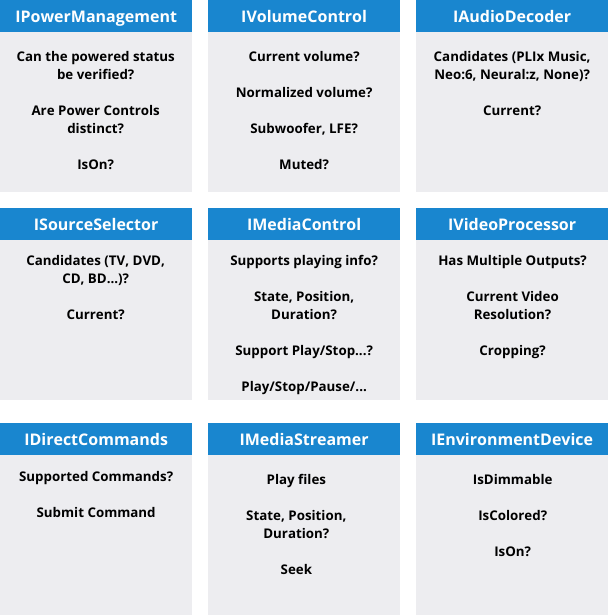
IDirectCommands
This interface is one of the most fundamental one. It is used as a binding concept throughout the system, but also can be used to infer interfaces from genetic devices, but also to public normalized commands from implemented interfaces. IR devices (implemented like a virtual remote control) are the most obvious case where their integration is achieved through IDirectCommands.
Inferring Interfaces
Let’s assume a simple Bluray player controlled by a remote control with commands to power toggle, play/pause/stop commands (“PowerToggle”, “Play”, “Pause”, “Stop”, “Eject”). Upon initialization, the device IRDevice subclass would automatically create a InferredPowerManagement object (with “Can verify power?” to false) and a InferredMediaControl object (with “SupportsPlay” to true and “SupportsRecord” to false),
Inferring direct commands
Let’s assume a simple Bluray player controlled by a TCP/IP interface that required supporting code to be added. So that new MyBlurayDevice class, inheriting from Device, would automatically add DirectCommands to match the intefaces supported. Example: “PowerOn”, “PowerOff” to match the IPowerManagement composed interface, and “Play”, “Stop”, “SkipForward” to map to underlying IMediaControl implementation.
 Christian-Eric Falardeau