So far we have identified how to separate devices functions (interfaces) and how to harmonize a standard set of commands (IDirectCommands). Now is the time to address how to actually control those devices.
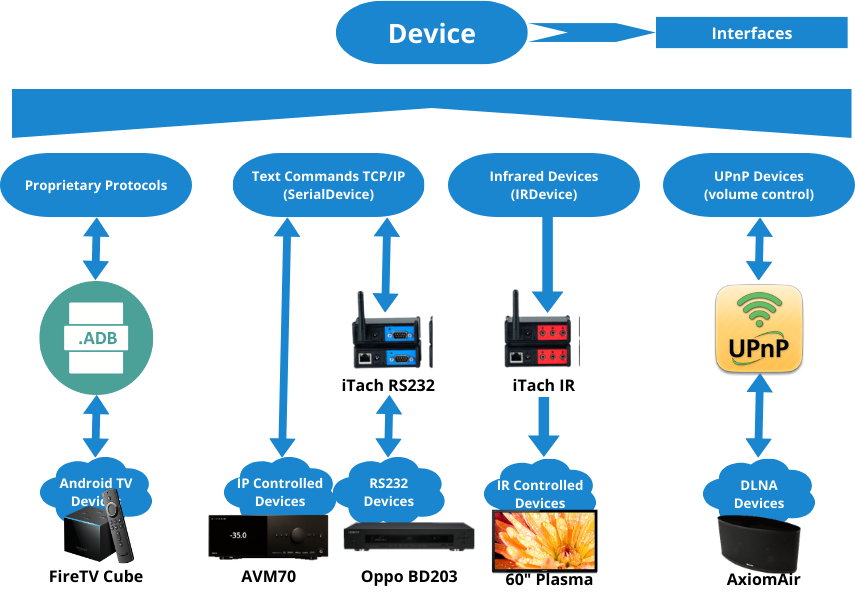
The above diagram distinguishes between the different patterns of control, tools and intermediate software required and an example of such a device.
Proprietary Protocols
These devices, by definition varies greatly. Currently only one type of device (excluding environmental devices and streaming) requires a special protocol access: FireTV Cube. To fully integrate that device into the folds we are using the Android Debug client/server (requires the device to have “developer mode on” and “allow ADB to yes”).
From there it becomes possible to power on/off, wake up the system and determines current states. It is also possible to determine (and select) what is currently running. Those allowing to create a Source Selector interface for Amazon Prime, Netflix, Disney+ and automatically creates commands such as “InputPrime”, ‘InputNetflix” and “InputDisneyPlus” that will later on allow the creation of sub-activities.
Text Commands
Many advanced devices support RS232 or “Telnet” text-based API. Each one of those devices requires a separate implementation to map normalized interfaces to low-level commands and responses. Only the “text in/out” is shared by all. This allows for a very tight and rich level of functionality and, more importantly, the possibilities to obtain information. Is it really on? What is the current video resolution? What source is currently selected?
The system doesn’t support directly RS232 protocols, but instead makes use of GlobalCaché devices to provide a TCP/IP connection to serial ports.
Infrared Devices
A very common and easy way to control devices is through virtual IR remote controls. Once again using GlobalCaché devices to transmits IR instructions to IR broadcasters which are then placed over the IR receiver of the devices. Each IR device is supplied with a text file (ending in .IR) describing the commands. The commands are used directly as part of a IDirectCommands interface, which are then used to inferred various interfaces (IPowerManager, IMediaControl, ISourceSelector…).
PowerToggle,40000,1,1,97,22,49,23,25,23,49,23,25,23,49,23,25,23,25,23,25,23,49,23,25,23,49,23,49,23,25,23,49,23,25,23,25,23,25,23,49,23,49,23,49,499,97,22,49,23,25,23,49,23,25,23,49,23,25,23,25,23,25,23,49,23,25,23,49,23,49,23,25,23,49,23,25,23,25,23,25,23,49,23,49,23,49,499,97,22,49,23,25,23,49,23,25,23,49,23,25,23,25,23,25,23,49,23,25,23,49,23,49,23,25,23,49,23,25,23,25,23,25,23,49,23,49,23,49,499,97,22,49,23,25,23,49,23,25,23,49,23,25,23,25,23,25,23,49,23,25,23,49,23,49,23,25,23,49,23,25,23,25,23,25,23,49,23,49,23,49,499,97,22,49,23,25,23,49,23,25,23,49,23,25,23,25,23,25,23,49,23,25,23,49,23,49,23,25,23,49,23,25,23,25,23,25,23,49,23,49,23,49,499,97,22,49,23,25,23,49,23,25,23,49,23,25,23,25,23,25,23,49,23,25,23,49,23,49,23,25,23,49,23,25,23,25,23,25,23,49,23,49,23,49,803Blue,40000,1,1,97,23,25,23,49,22,49,22,25,23,25,23,49,22,49,22,25,23,49,22,25,23,49,22,49,22,25,23,49,22,25,23,25,23,25,23,49,22,49,22,49,476,97,23,25,23,49,22,49,22,25,23,25,23,49,22,49,22,25,23,49,22,25,23,49,22,49,22,25,23,49,22,25,23,25,23,25,23,49,22,49,22,49,476,97,23,25,23,49,22,49,22,25,23,25,23,49,22,49,22,25,23,49,22,25,23,49,22,49,22,25,23,49,22,25,23,25,23,25,23,49,22,49,22,49,476,97,23,25,23,49,22,49,22,25,23,25,23,49,22,49,22,25,23,49,22,25,23,49,22,49,22,25,23,49,22,25,23,25,23,25,23,49,22,49,22,49,803UPnP Infrared Devices
A special case of infrared devices are those which are also media streamers. A special type of device (haply named UPnPIRDevice) is then used to bind to IR commands, but also allow the device to participate in the streaming sub-system.
UPnP Devices
UPnP is a universal control protocol. Although in the future, this protocol could be used for other purposes, right now it is only used to control the volume in certain cases like the portable “room” represented by the AxiomAir (a device that becomes it’s own location!).
 Christian-Eric Falardeau