Controlling the Devices (low level)
Insteon Devices
Insteon devices are controlled through simple HTTP calls while events are trapped using a SOAP callback set by the sever. Devices have to be added through the Universal Devices portal and are then discovered by the server. The “human names” given is then used inside the system without further ado.
Kasa Devices
For Kasa Devices, the server uses a NuGet package to avoid implementing a pretty complex protocol from TP Link. In the case of Kasa devices, they need to be declared in the server configuration XML file prior to use. (see below)
Note that no Kasa switches are supported as the moment.
Configuring the Devices
Kasa Devices
<lights>
  <light name="front" type="kasa-plug" ip="a0:b3:c4:d5:e0:ef" />
  <light name="bells_and_whistles" type="kasa-strip" ip="a0:b3:c4:d5:e1:e2" />
  <light name="for_camera" type="kasa-light-white" ip="a0:b3:c4:d5:e7:e5" />
</lights>
Insteon Switches Input
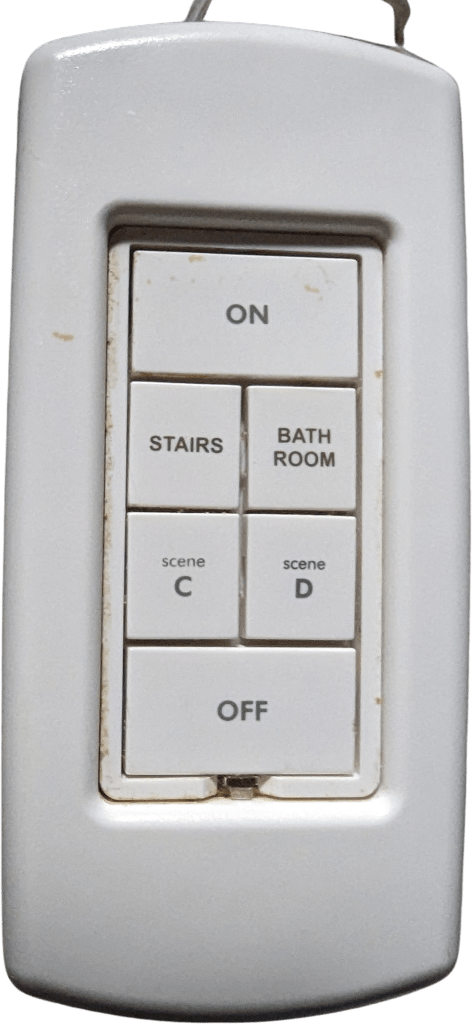
The switches are first configured inside the ISY portal. Once provided with a name, it can be mapped inside the system. In this example, the keypad on the left is mapped to the commands on the right. If the name matches a location (like the example below), then it is used as is. Otherwise, it could be specified as follow: [HTControl:HomeTheater] (where HTControl is the ISY name and HomeTheater the room name).
[HomeTheater]
on_off=activity.PC_MUSIC,location.off
A=volume.up
B=transport.play
C=volume.down
D=transport.pause
The buttons names don’t match anymore, but volume is being controlled using “Stairs/C” and play/pause form “Bath Room/D”.
 Christian-Eric Falardeau