Let’s have a look at a more pure-software side of the system: streaming!
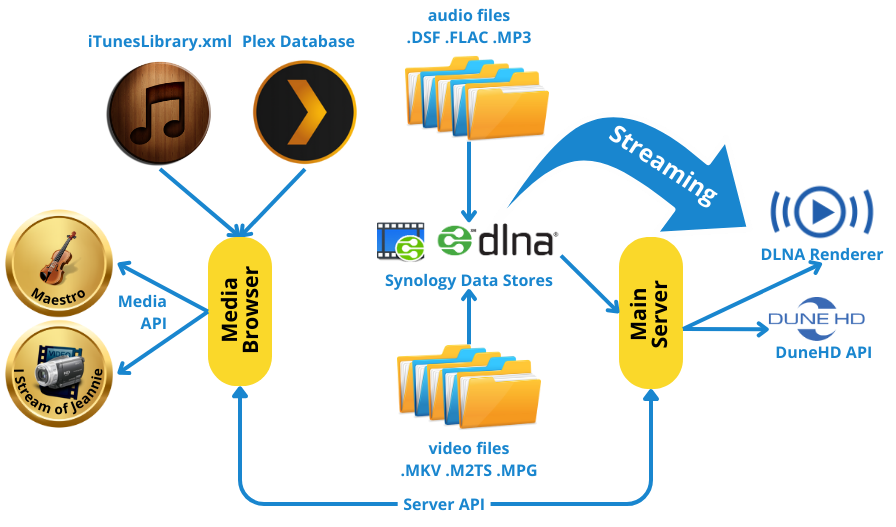
DLNA Media Servers
The system takes its input from configured data sources. Not only the lists of items available is extracted, but also as much pertinent info as available (resolution, formats, number of channels…).
<datastore>
  <audio upnp="CEFMusicStore" cache="C:\CEF Software\Server\UPNPAudioFiles.db" root="0" path="Music|All music" excludes="" chunk="1000" />
  <video upnp="CEFDataStore" cache="C:\CEF Software\Server\UPNPVideoFiles.db" root="33" />
</datastore>
Multi-Formats audio files
To support various music sources and environments, multiple copies of the same track might be available. For example, a track from a 5.1 SACD could have:
a 5.1 DSF version (original, multi-channel)
a 5.1 FLAC (96/24) version
a 2.0 DSF version (original, stereo)
a 2.0 FLAC (96/24) version
a 2.0 MP3 (128 kpbs) version, solely used by iTunes for tagging
Based on the active activity (device) and location (A/V processor), the best available option is selected automatically by the music streaming subsystem.
DLNA Renderers
Although a pretty strict standard, implementations rarely comply fully and many quirks had to be overcome, which created “dlna patterns”. Each pattern needs to indicate if it is supporting multichannel, gapless and all possible resolutions and supported formats. Here are some examples:
<dlna pattern="Kodi">
  <audio gapless="true" multichannel="true" pollstates="true" formats="DXD,FLAC192,FLAC96,FLAC48,CD,Apple"/>
  <video files="m2ts,mpeg,mkv" codecs="H264,MPEG2" seek="1000"/>
</dlna>


<dlna pattern="foobar2000">

      <audio gapless="true" track_change="position"  formats="DXD,DSD128,DSD64,FLAC192,FLAC96,FLAC48,CD,Apple"/>

    </dlna>


<dlna pattern="OPPO" power="managed">

      <audio multichannel="true" formats="FLAC192,FLAC96,FLAC48,CD,Apple"/>

      <video files="m2ts,mpeg" codecs="H264,MPEG2,VC-1"/>

    </dlna>
Now, once the family of devices is known, we can declare individual media players. The connection method allows the system to assume a delay of “negotiation” for HDMI connections and makes sure the actual playback does not start until stable.
<device name="KodiHomeTheater" type="KodiDevice" location="HomeTheater" upnp="Kodi - HomeTheater" connected="HDMI" />

<device name="KodiReadingRoom" type="KodiDevice" location="ReadingRoom" upnp="Kodi - ReadingRoom" connected="Analog" />

<device name="FoobarOffice" type="FoobarDevice" location="Office" upnp="foobar2000 - Office" connected="USB" />
DuneHD media player
The DuneHD media player family is a set of very powerful devices that can properly stream 4K and 3D movies without batting an eye, and even SACDs. Unfortunately it does not support DLNA. However, it does support a TCP/IP based API that allows device control and to initiate playback using the same URLs as for DLNA.
<device name="DuneHomeTheater" type="DUNEHD" location="HomeTheater" ip="14:C0:89:44:E8:40" /> Christian-Eric Falardeau